Most field service software starts in the office. ScanSticker starts at the equipment.
A durable QR sticker goes on every unit you service. One scan opens the machine's full record for your tech, and gives your customer a button that sends the request straight to you.
Flat monthly price, published below · No demo call · No contract
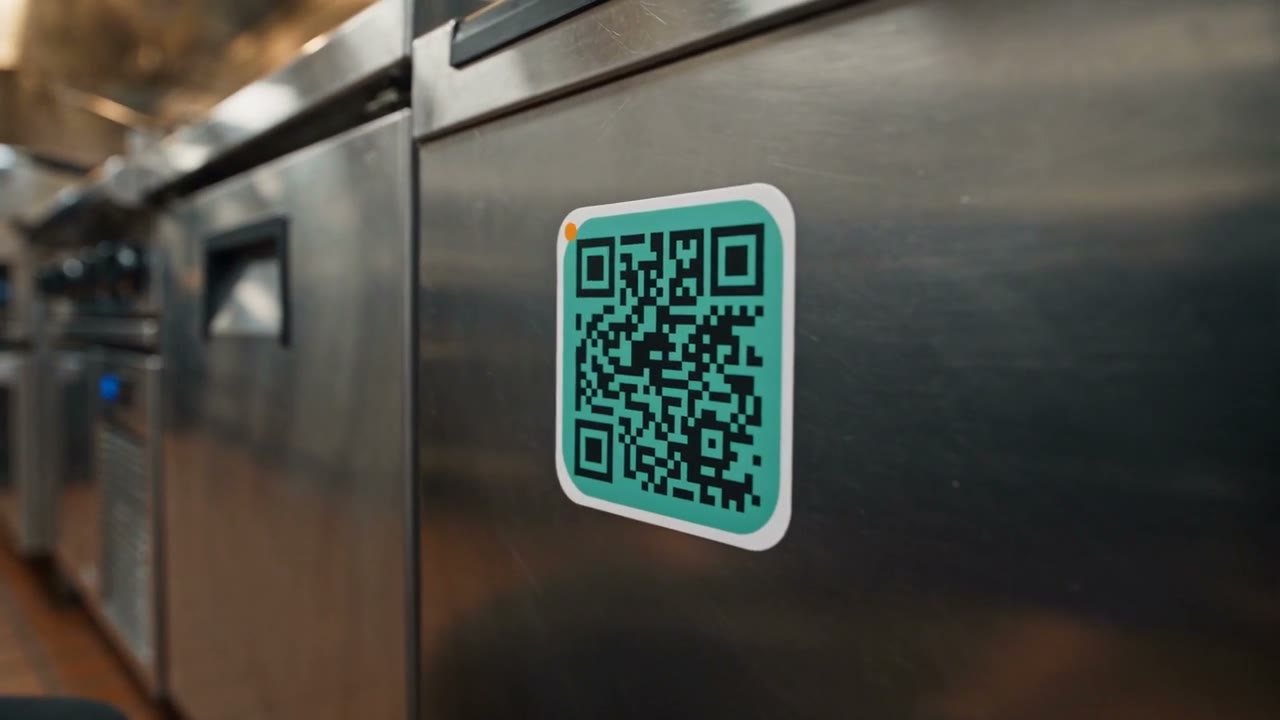
One sticker, three jobs.
A durable QR sticker with your name on it goes on every unit you service: the walk-in, the rooftop unit, the fryer, the chiller.
When it breaks, they scan, you respond.
The kitchen manager scans the sticker on the dead unit, taps Request Service, and the request lands in your queue with the machine already identified. No phone tag, no "the cooler on the left." When customers call instead (some always will), the office logs it the normal way and picks the asset from the site's register. Everything after that works the same.
Your tech never walks up blind.
On arrival, the tech scans the same sticker and sees the whole machine: model, serial, photos, warranties, manuals, and every visit your company has logged. Nobody has to call the office to ask what happened last time.
Built-in customer retention.
Your name and number stay on the unit for the life of the machine. Two years from now, when it breaks again, the building engineer's easiest path is the sticker with your brand on it, not a search box.
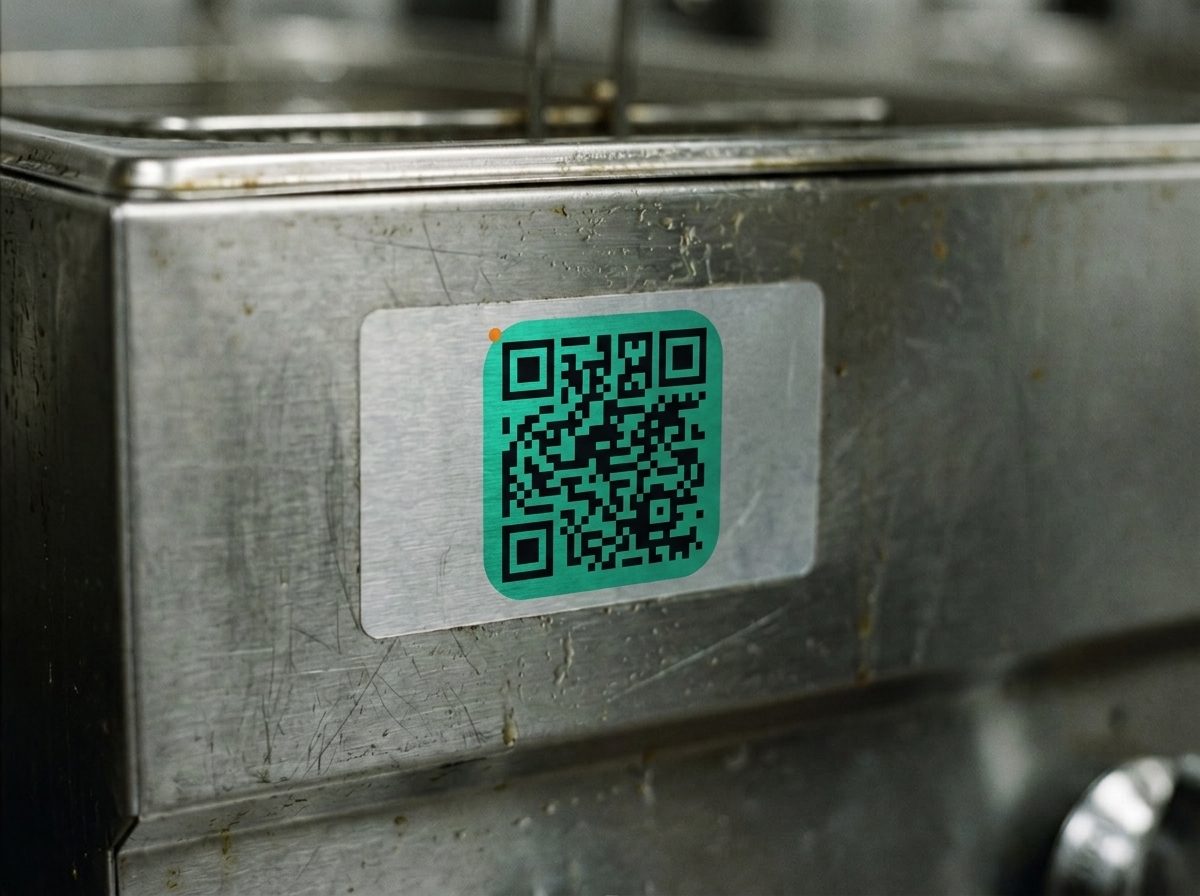

This code is real. Scan it with your phone.
You'll land on the public page for a demo ice machine, the same page your customers see when they scan a unit you've tagged. On your phone right now? Tap here to open the demo page instead.
A damaged sticker never costs you data. The sticker is only a pointer; the record lives in ScanSticker. Print a replacement, link it to the same asset, and the history is all still there.
What the scan opens.
This is a real unit from the demo shop: a Scotsman N0922 nugget ice machine at the service bar. Real OEM manuals, real part numbers from the N0922 parts catalog. Tap through it.
The data plate that never grease-fades
The digital data tag.
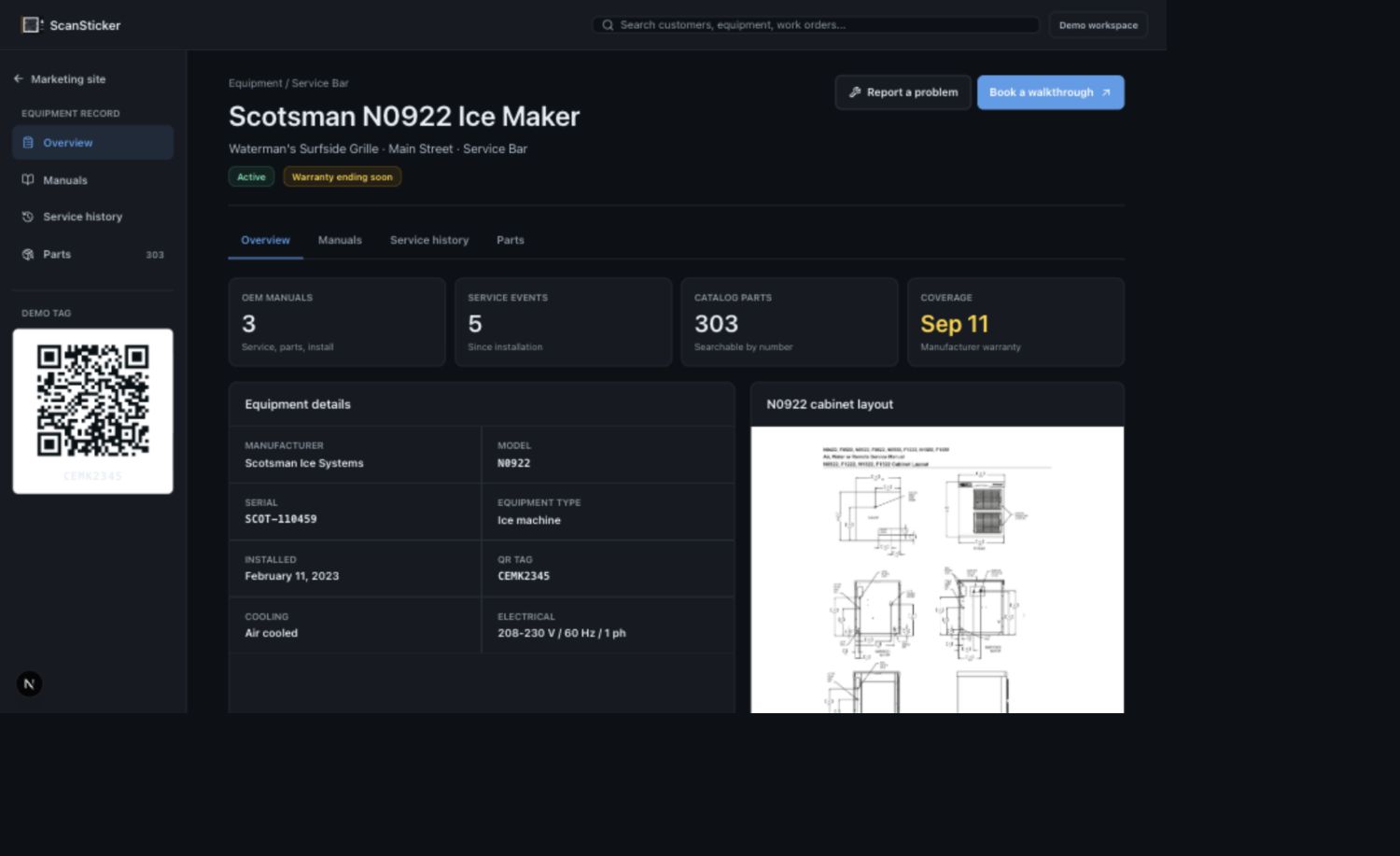
Make, model, serial, install date, location, and whether the warranty is still alive. Answered from the parking lot, before anyone opens a panel or squints at a grease-faded nameplate.
Three years of history, in order.
Every visit on this machine, newest first. The June repair names the exact filter it used, so the next tech knows what was touched and when. This history survives tech turnover, voided invoices, and software switches.
The OEM library, on the unit.
The Scotsman service manual, the illustrated parts breakdown, and the install and user manual are attached to this machine. The tech reads them standing in front of it instead of calling the office or digging through a truck binder.
Parts, from this machine's own catalog.
The parts list is the N0922's real catalog, so the tech picks the exact filter, valve, or auger and taps Send order to parts dept. The office gets the request tied to this unit and this job, with the job held until the part lands. A public scan never shows ordering or pricing; that side needs a technician login.
Tag one unit this week and see what your customer sees.
Start your 7-day free trialOne record from request to payment.
Request, estimate, work order, invoice, payment. The same record moves through each step, so the office isn't re-typing the same job into three different screens.
Statuses set themselves.
There is no status dropdown to forget. On My Way, Start, and Finish are things a tech already does, and the board updates itself from those actions. Dispatch sees what's happening in the field, not what somebody remembered to set.
Dispatch that handles the messy parts.
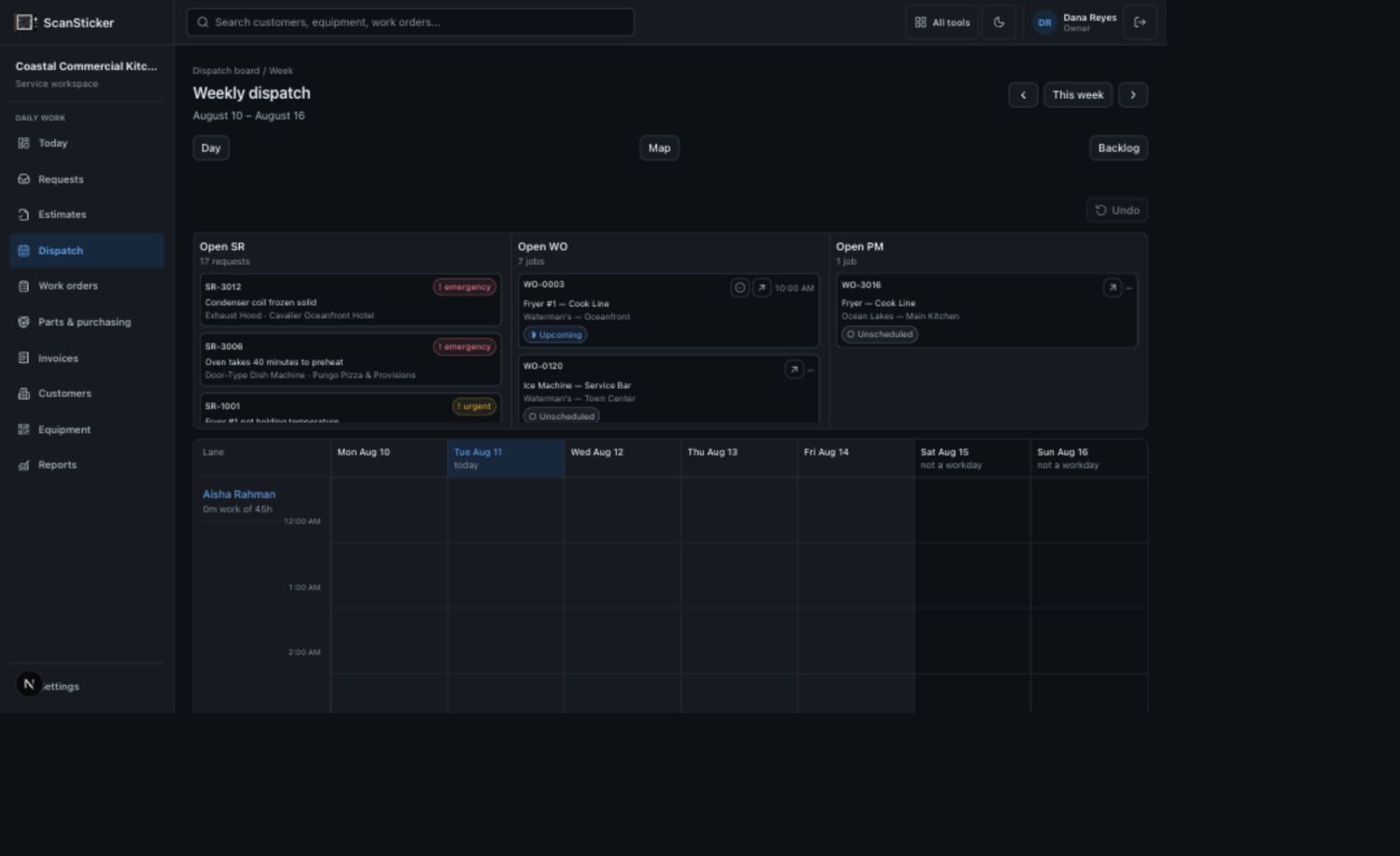
Assign work, hold a job for parts, cut the purchase order, and release the job to its own "needs a slot" lane when the part lands, all from the board.
Estimates your customers approve from their phone.
Optional lines toggle with a live total, so add-on work sells itself without a second call. Approval creates a tamper-evident acceptance record: signature, agreed total, timestamp. With Approve & Pay Deposit, the customer approves and pays the deposit through Stripe in one step, so the job is funded before you order parts.
Bill the Clock.
Clocked technician minutes become labor lines on the invoice in one tap. The hours your techs actually work stop evaporating between the truck and the bill.
A real equipment record, not a note on a customer file.
Commercial equipment has commercial paperwork: a compressor warranty that ends on a different date than the parts warranty, serialized components, spec sheets, checklists. The asset record holds all of it.
Room for the real paperwork.
Multiple warranties per unit, each with its own end date, so you know what's covered before you quote. Serialized components tracked under the parent unit. Spec fields scoped by equipment type, so an ice machine's record asks ice-machine questions. Manuals readable at the machine. Checklists that attach themselves by equipment type.
History that can't walk out the door.
Every visit stays on the unit permanently. Voiding an invoice doesn't erase what happened, and a tech leaving doesn't take the account's memory with them. This is the last migration where your service history is the hostage.
PM triggered by how hard the machine actually runs.
Calendar PM treats every unit the same. The fryer running sixteen hours a day and the rooftop unit cycling all summer get the same service date as the ones barely working, and somebody pays for that. ScanSticker triggers PM per unit: by calendar, by equipment meter hours, or whichever comes first. As of August 2026, none of the big three publish a way to trigger PM off equipment usage. Calendar recurrence is their ceiling.
comes first
PM visits also feed your repair pipeline. A finding your tech logs during the visit (a worn fan, a door gasket on its last season) becomes a quoted repair estimate the customer approves from their phone. The agreement brings you to the machine. The findings bring the repair work home.
Get paid through Stripe processing and export to QuickBooks.
The pay button does the chasing.
Invoices go out by email with a pay link in them. Customers pay by card or ACH through Stripe. Deposits collect at estimate approval, balances at invoice, and you stop being your own collections department. Checks from net-30 accounts get recorded in ScanSticker and push to QuickBooks like any other payment.
We compute the tax. QuickBooks records it.
Sales tax on repair invoices is genuinely hard: repair labor, parts, trip charges, and freight are each taxed differently depending on the state. We ran our own test, a plain repair invoice through QuickBooks' automated sales tax. It taxed labor that Virginia exempts, and under a different company setup it returned zero tax on the same invoice. So ScanSticker doesn't hand it the question. A built-in state tax engine decides tax per line, citing the rule it applied, and pushes the invoice to QuickBooks Online with the exact line-by-line treatment. Your bookkeeper reconciles without surprises.
What syncs, and when.
Issued invoices and payments, with exact line-level tax amounts, into the QuickBooks Online company you already run. One-way by design, and off until you turn it on: connect when you're ready, and only issued invoices push. QuickBooks Online, not Desktop.
The demo is your own bookkeeper. Run one real invoice through the trial and have them check the lines.
INV-0112 · Blue Heron Restaurant Group — Site #4 NET 30
Illustrative example of per-line tax treatment on a Virginia repair invoice.
Run one real invoice through the trial. Let your bookkeeper check the lines.
Start your 7-day free trialBuilt for the customer with eight locations.
Landing a restaurant group or a property manager is how a shop grows. It's also where the billing gets messy. ScanSticker treats one account with many sites and many machines as the normal case.
One clean invoice.
Bill per site or consolidated per account, instead of stitching invoices together by hand at month end. Each line traces back to the job it came from.
A register for every site.
Every unit at every location, organized by site, by line, and by unit, with status and history a facility manager can check without calling you.
A portal that's safe to share.
Magic-link sign-in, no passwords to reset. Customers see approved documents, statuses, and history. They never see parts pricing, internal notes, or your rates. A five-truck shop reads like a much bigger operation, without giving anything away.

Most field service apps run the job. ScanSticker helps you own the equipment relationship.
There are plenty of capable products. The table below is about fit for a specific kind of business: contractors who service equipment, carry PM agreements, and bill commercial customers with more than one location. If that's not you, a broader field-service suite may serve you better, and we'd rather say so here than after you've migrated.
| What a buyer should ask | ScanSticker | General job app | Home-service suite | Enterprise FSM |
|---|---|---|---|---|
| Is the price published, and does it change when you hire? | Flat monthly, on this page; unlimited users | Published; tiered, plus per-user fees past plan limits | Published; tiered, per-user fees past limits, paid add-ons | Not published; priced per technician, quoted after a demo |
| Can you try it self-serve? | 7-day free trial, no demo required | 14-day trial | 14-day trial | No trial; demo and contract first |
| Contract terms | Month to month | Monthly or annual billing | Monthly or annual billing | 12+ month terms are standard |
| Per-unit equipment record (serial, multiple warranties, components, manuals) | Yes; the center of the product | No equipment record; history attaches to the client | Property profiles, residential depth | Per-unit equipment records; enterprise setup |
| QR sticker on the unit that opens the asset and takes customer requests | Yes | No | No | No |
| PM triggered by meter hours, or whichever comes first | Yes, per unit | Calendar recurrence | Visit-frequency plans (top tier) | Calendar-based agreements |
| Do PM findings become quoted repair estimates? | Yes, built in | Not built in | Not built in | Via enterprise configuration |
| Who computes sales tax on repair invoices? | Built-in state tax engine, per line, with citations; exact amounts pushed to QuickBooks Online | Relies on QuickBooks or manual rates | Relies on QuickBooks or manual rates | Generic accounting sync |
| Consolidated per-site invoicing for multi-site accounts | Yes, included | Invoices per job | Not in published plans | At enterprise scale and price |
| Customer portal that hides your rates and internal notes | Yes; magic-link, every plan | Client hub for quotes and invoices; no equipment view | Basic portal; no asset history | Varies by package |
| Where it's the honest best fit | Equipment-service contractors with PM agreements and multi-site commercial customers | Residential trades that want the easiest all-around tool | Home services that run on reviews and fast payouts | Large operations with an ops team and deep reporting needs |
Comparison reflects each product's public pricing and feature pages as of August 2026. Verify current terms before relying on any cell. All trademarks belong to their owners.
One flat price. It's right here.
Your software bill shouldn't go up because you hired a technician. Every plan is flat monthly with unlimited users, and everything is included: the sticker system, dispatch, estimates, invoicing, Bill the Clock, the PM engine, the customer portal, and the QuickBooks Online integration. No per-seat fees, no add-on ladder, no feature you find out later costs extra.
Starter
Getting started: 1-2 techs
$99/month
- Everything included
- Unlimited users
- Up to 250 active equipment records
Shop
Growing commercial shop: 3-8 techs
$199/month
- Everything included
- Unlimited users
- Up to 1,500 active equipment records
Fleet
Multi-crew operation with a large equipment base
$399/month
- Everything included
- Unlimited users
- Up to 10,000 active equipment records
Tiers scale by equipment under management, never by headcount, and the limits are set high enough that stickering everything stays the point, not a cost. Stickers print from the app on standard label stock, or export for your print vendor: no hardware to buy, no per-sticker fee. Every plan: 7-day free trial, month to month, cancel anytime, data export included.
Third-party costs stay separate. Customers pay their own Stripe processing, Stripe Tax usage when enabled, and QuickBooks Online subscription. ScanSticker includes the connection and workflow.
Why flat pricing? Per-seat fees punish hiring, and add-ons punish trust. Those are the two complaints we hear most from contractors leaving their last tool, so we removed both.
ScanSticker is new. Here's what we offer instead of a logo wall.
The product, tonight.
Start the trial and put your own equipment in it without waiting for a sales call.
Your money never depends on us.
Payments run in your own Stripe account. Invoices live in your QuickBooks Online. If we disappeared tomorrow, your revenue and your books wouldn't.
Your data is yours.
Export customers, equipment records, and service history whenever you like. We'd rather you stay because leaving is easy.
A small bet, on purpose.
Flat monthly, month to month, no implementation fee, no contract. Being wrong costs you one month, not a year.
"I ran maintenance for a restaurant group. Service history lived in binders, in one tech's head, and on whatever magnet was stuck to the office fridge. When a unit went down, we called whoever we could remember, and the contractor who'd worked on that machine for years never knew the call went elsewhere. ScanSticker is the tool I wanted on both sides of that phone call. Put your name on the machine. Keep the history where the work happens."
Parker Phillips · Founder, ScanSticker
Questions we actually get.
Short answers below. If yours isn't here, email hello@scansticker.com and a human will answer it.
You're new. Why would I run my business on you?
What does it really cost once the add-ons start?
Will it actually sync with QuickBooks? My bookkeeper has scars.
My customers won't scan a QR code. They'll call like they always do.
Stickers on commercial equipment? They'll cook off, freeze off, or get pressure-washed into oblivion.
My techs ignore software. They never update the status dropdown.
How painful is switching from another field service app?
Is there a technician mobile app?
What happens to my data if you disappear?
Give your techs the manual, part info, and service history before they open the panel.
The minutes they stop spending on manual searches, part lookups, and repeat phone calls are the minutes that finish one more job before the day spills into overtime or the on-call schedule.
Start your 7-day free trialFlat monthly price · No demo call · No contract · Your data exports anytime